Repair & salvage
Steempeg fixes broken clips in two ways:
- Automatic repair — silent, for every clip. Steam's manifests often point at the wrong chunks or start times; Steempeg writes a corrected copy and plays from that.
- Salvage — on request, for Dead clips. Steempeg rebuilds a playable manifest from whatever chunks survive. If it plays and the check passes, the clip becomes Cured and can be rendered again.
Your original files are never touched
Steempeg never overwrites or deletes Steam's files. Every fix is written as a new file next to the originals (see Files Steempeg adds).
Automatic repair
There is no button — it happens whenever Steempeg opens, previews, thumbnails or queues a clip.
Fixed manifest
Steam's session.mpd describes the chunks loosely, which causes seek drift
(the famous "+6 seconds") and playback that stops early. Steempeg reads it,
lists the chunks that really exist on disk, and writes an exact
session_fixed.mpd:
- the timeline starts at zero;
- every surviving video and audio chunk is listed explicitly;
- the real start offset is read from the chunks, so seeking lands where you click.
If Steam updates session.mpd later, the fixed copy is rebuilt. If the fix
fails, Steempeg falls back to the original manifest.
Rebuilt manifest
If a clip folder has chunks but no manifest at all (Steam crashed before
writing it), a library scan rebuilds one from scratch as
session_recovered.mpd, assuming Steam's standard 3-second chunks. The
clip then shows Issues with
Reconstructed manifest only (no original session.mpd) — it plays, but the
length may be approximate.
This needs the clip's own video header (init-stream0.m4s). Without it the
clip is Dead and only salvage can help.
Salvage (force play)
Salvage is for Dead clips. There are two ways in:
- Open the Dead clip. The Dead Clip dialog appears — click Try to recover.
- Health button in the player header → ▶️ Force play (salvage).
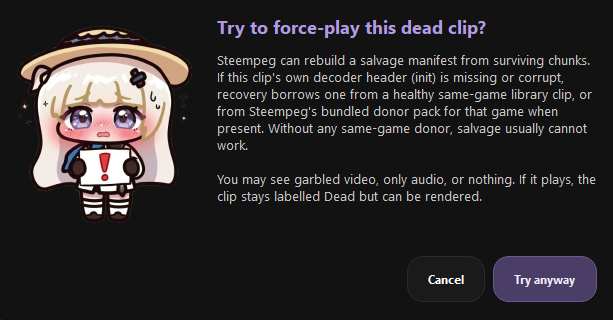
Confirm with Try anyway. Steempeg then:
- Collects every surviving video chunk.
- Checks the clip's own video header (
init-stream0.m4s). - If the header is missing or broken, borrows one from a donor:
- a healthy clip of the same game in your library;
- otherwise a bundled donor shipped with Steempeg for that game.
- Writes
session_salvage.mpd(and, when a donor was used, a copy of its header asinit-stream0-salvage.m4s). - Starts playback from the salvage manifest.
What you may see
Salvage is best effort. You might get garbled video, audio only, or nothing. The clip stays Dead until you confirm it played.
Why donors work
Recordings of the same game usually share the same decoder header. A healthy clip of that game can stand in for the missing one. A header from a different game will not work, so a Dead clip with no same-game donor is usually unrecoverable.
No donor? Record one
Record a few seconds of the same game with Steam, let Steempeg pick it up, then try Force play (salvage) again.
Becoming Cured
Once salvage playback starts, Steempeg asks:
Did the salvaged clip play correctly?
- Yes, it works — Steempeg runs an internal check: the player must be running the salvage manifest and must have decoded a real frame or played at least about a third of a second. Saying yes without real playback does not count.
- Not yet — the clip stays Dead.
Tick Always play this clip via salvage without asking to skip the dialogs next time you open it.
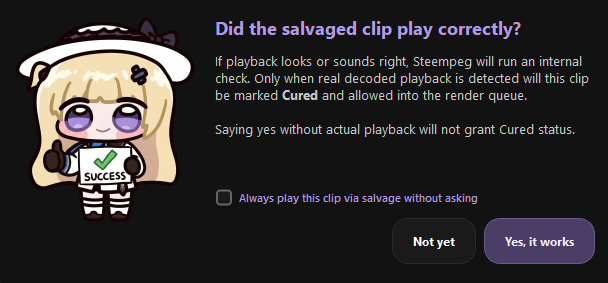
When the check passes, the Clip Cured dialog confirms it and:
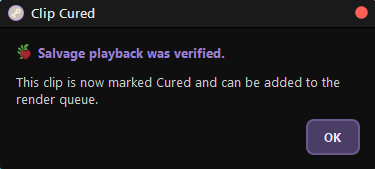
- the health dot turns purple and the header shows Cured;
- the clip can be added to the Render Queue and rendered (from the salvage manifest);
- a Cured chip appears in Filters → Health;
- the status is remembered across restarts.
If the check fails you get Could not verify playback with the reason (for example No decoded playback was detected.), and the clip stays Dead.
Cured is a label, not a rewrite
The files on disk are still damaged — a Cured clip simply has a verified way to play. Re-check clip health will still see it as Dead underneath, but the Cured label stays. Deleting the clip clears it.
When salvage cannot help
Nothing to salvage — Could not recover this clip appears when:
- there are no usable video chunks, or
- the video header is gone and no same-game donor exists (library or bundled).
Damage inside the video itself cannot be undone either, and the audio header is never borrowed, so some salvaged clips play without sound.
Files Steempeg adds
All of them sit in the clip folder next to Steam's files. Nothing is deleted or overwritten.
| File | Written by | Purpose |
|---|---|---|
session_fixed.mpd |
Automatic repair | Exact manifest for accurate playback and seeking. |
session_recovered.mpd |
Library scan | Rebuilt manifest when Steam's is missing. |
session_salvage.mpd |
Salvage | Best-effort manifest for a Dead clip. |
init-stream0-salvage.m4s |
Salvage | Copy of a donor's video header. |
Leave them in place: Steempeg reuses them, and a Cured clip plays and renders
through its session_salvage.mpd.
Next
- Clip health — the four states and every check
- Clips Manager — cards, selection, filters