Clip health
Steam records clips as DASH: a manifest (session.mpd) plus many small
video and audio chunk files. If Steam crashes, the disk fills up, or a folder
is partly deleted, a clip can lose pieces and stop playing. Steempeg checks
every clip and labels it with one of four health states.
The four states
| State | Dot | Plays? | Can render? | Meaning |
|---|---|---|---|---|
| Healthy | 🟢 green | Yes | Yes | Nothing wrong found. |
| Issues | 🟡 amber | Yes | Yes | Plays, but something is off (see the list below). |
| Dead | 🔴 red | No | No | Cannot play normally. The card is dimmed. |
| Cured | 🟣 purple | Via salvage | Yes | Was Dead, but salvage playback was verified. See Repair & salvage. |
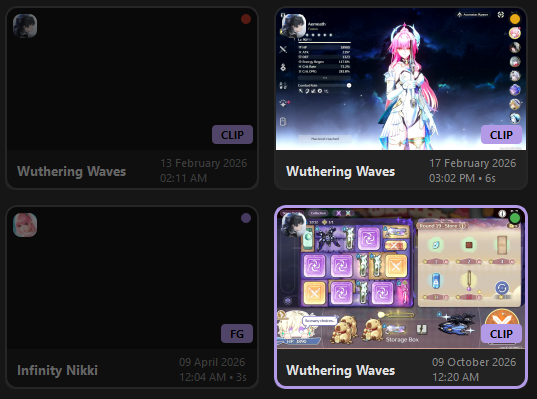
Top row: Dead, Issues. Bottom row: Cured, Healthy.
Where you see health
On the card
A small coloured dot in the top-right corner of every ClipCard. Dead cards are also dimmed.
In the player header
When a clip is open, the header shows a tinted health button with an icon
and label (Healthy, Issues, Dead, Cured). Hover it for a one-line
summary; click it for the full list of problems.
For Dead clips the menu also offers:
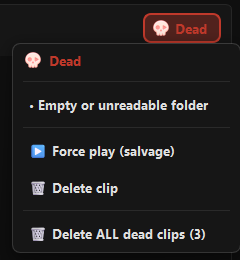
- ▶️ Force play (salvage) — see Repair & salvage;
- 🗑️ Delete clip;
- 🗑️ Delete ALL dead clips (N) — asks first; Cured clips are never included.
In Filters and Sorting
- Filters → 💚 Health has chips for Healthy, Issues, Dead and Cured.
- Sorting → Bad health first / Good health first puts the worst (or best) clips on top.
What Steempeg checks
Checks run on the files in the clip folder, in this order.
Dead
A clip is Dead when any of these is true:
| Problem | Shown as |
|---|---|
The video init segment (the decoder header, init-stream0.m4s) is missing or empty |
Missing or corrupt video init segment (init-stream0.m4s) |
| No video chunks left on disk (empty chunk files do not count) | No video chunks on disk |
| The manifest exists but cannot be read | Cannot read manifest |
| The manifest fails a real open test (see ffprobe below) | Manifest cannot be opened (unplayable) |
| Video chunks exist but there is no manifest at all | Video chunks present but no playable manifest |
| The folder is empty or unreadable | Empty or unreadable folder |
Issues
A clip has Issues when it plays but any of these is found:
| Problem | Shown as |
|---|---|
| No audio track (no audio header or no audio chunks) | No audio track on disk |
| Steam's manifest was lost and Steempeg rebuilt one from the chunks | Reconstructed manifest only (no original session.mpd) |
| The manifest claims a much longer clip than survives on disk (less than 30 s left and the claim is more than 5× that) | Manifest claims Ns but only K video chunk(s) survive (~Ss on disk) |
| Audio and video start 1 second or more apart | Audio/video start offset … |
| A jump of more than 30 seconds between the first video fragments | Corrupt decode timeline jump: … |
Anything else is Healthy.
ffprobe open test
For suspicious clips — rebuilt manifest, no audio, two or fewer video chunks, a timeline jump, or a length mismatch — Steempeg also asks ffprobe to open the manifest (6-second limit). If ffprobe cannot open it, the clip is Dead. This test runs only in Full checks, not in quick ones.
Clips with several recordings inside
Some Steam clips contain more than one recording folder. Steempeg checks each one and shows the worst result.
When health is checked
Results are cached in clip_health_cache.json and reused while the clip
folder is unchanged.
| Situation | Check |
|---|---|
| Progressive startup (default) | Cache, or a quick file check without ffprobe. |
| Quick startup | Cache, or a quick file check. |
| Full startup | Full check with ffprobe (cache still used when the folder is unchanged). |
| Skip startup | No check — shows last session's labels. |
| Adding / choosing a clips folder, Steam auto-discovery | Full check of the new clips. |
| Refresh | Full scan. |
Re-checking health
Refresh ▾ → 🩺 Re-check clip health (ffprobe)… ignores the cache and runs
the full check (with ffprobe) on every clip. The status bar shows progress
(Re-checking clip health (done/total)…), and a summary dialog lists how many
clips are Healthy, Issues and Dead.
Use it after you moved, restored or edited clip folders by hand, or when a label looks wrong.
What each state allows
| Healthy | Issues | Dead | Cured | |
|---|---|---|---|---|
| Play in the player | ✅ | ✅ | ❌ offers salvage | ✅ via salvage |
| Add to Render Queue | ✅ | ✅ | ❌ skipped | ✅ |
| Render (any preset, incl. Original) | ✅ | ✅ | ❌ | ✅ |
| Delete | ✅ | ✅ | ✅ | ✅ |
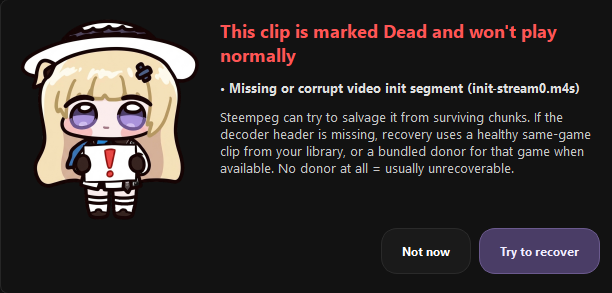
When you open a Dead clip, the player does not start. Instead a
Dead Clip dialog lists the problems and offers Try to recover. A Dead
clip already in the queue fails with
Source clip is Dead and cannot be rendered.
Next
- Repair & salvage — how Steempeg fixes clips and brings Dead ones back
- Clips Manager — cards, selection, filters